Quote any detail job in under a minute, text it from the driveway, and know your real profit on every job.
Without a monthly app fee.
Secure checkout by Gumroad · instant download · 30-day money-back guarantee
You're probably guessing. Guessing costs money.
You walk up to a minivan full of dog hair and sand. The customer asks "how much?" You do math in your head, say a number, and hope it was right.
That's not a skill problem. It's a system problem. Published 2026 price guides put pet-hair removal alone at $40 to and a full detail on an SUV at $225 to $350 (QuoteIQ, DetailPilot). Miss one add-on or one size bump and you've lost more than this kit costs.
What changes when you use DetailTab.
Same price every time
By vehicle size, condition, package and add-ons.
Quote on the spot
Fill in one column on your phone, then copy a ready-made text.
Know your floor
The private profit check shows the lowest price that covers your costs and your hourly goal.
Bigger tickets, no pushing
Show Good / Better / Best side by side and let the customer choose.
The kit, piece by piece.
Every screenshot is from the real example workbook. Names, prices and jobs shown are made-up examples.
Phone Quote
Quote on site in about a minute
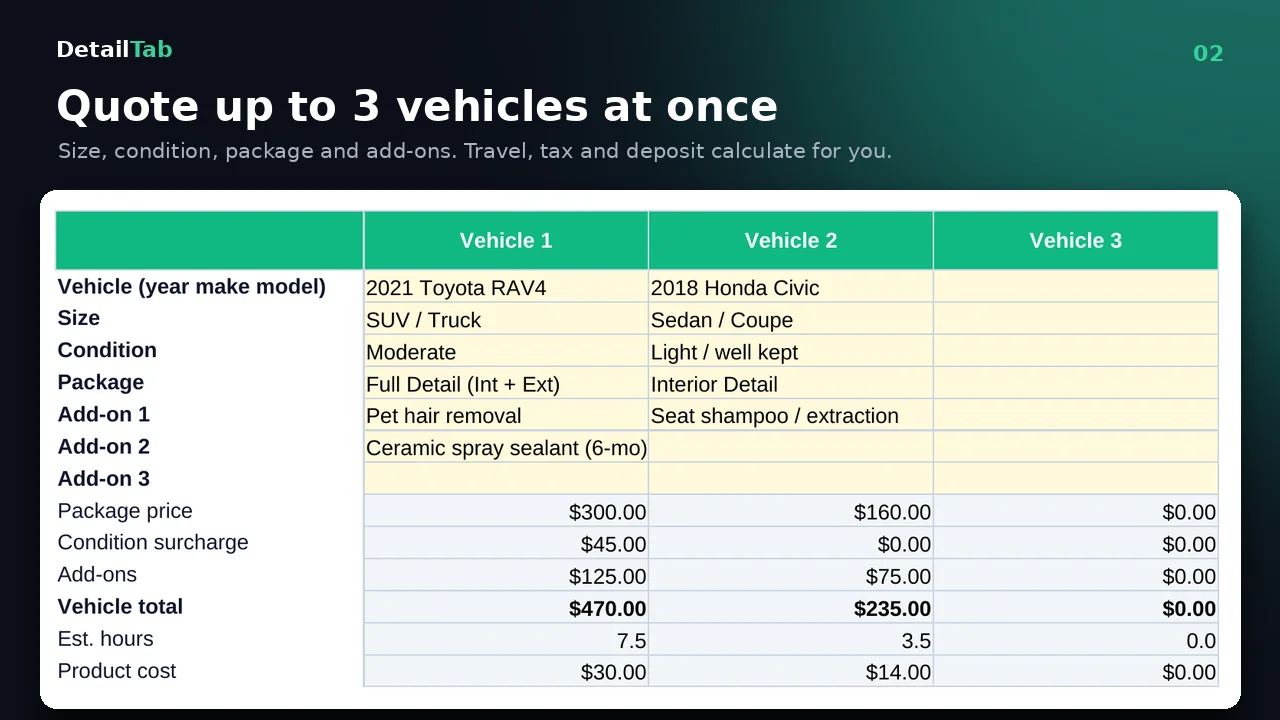
One column with big dropdowns. Pick size, condition, package and add-ons. You get the total, the deposit, and a text message written for you to copy into Messages.
Quote Builder
No more mental math
Up to 3 vehicles per job, with condition surcharge, add-ons, travel fee, discount, sales tax, deposit and balance.
True Profit Check
Know what you actually keep
Subtracts product, driving cost per mile, water and generator, helper pay, your share of insurance and phone, and card fees. Shows true profit per hour, a break-even price and a floor price. Customers never see it.
Good / Better / Best
Higher average ticket, without pushing
Three packages priced side by side for the customer's vehicle, plus copy-ready options text.
Invoice
Look like a real business
Fills itself from the quote, with a logo box, your terms and a signature line. Print or save as PDF.
Price Menu
Set it once
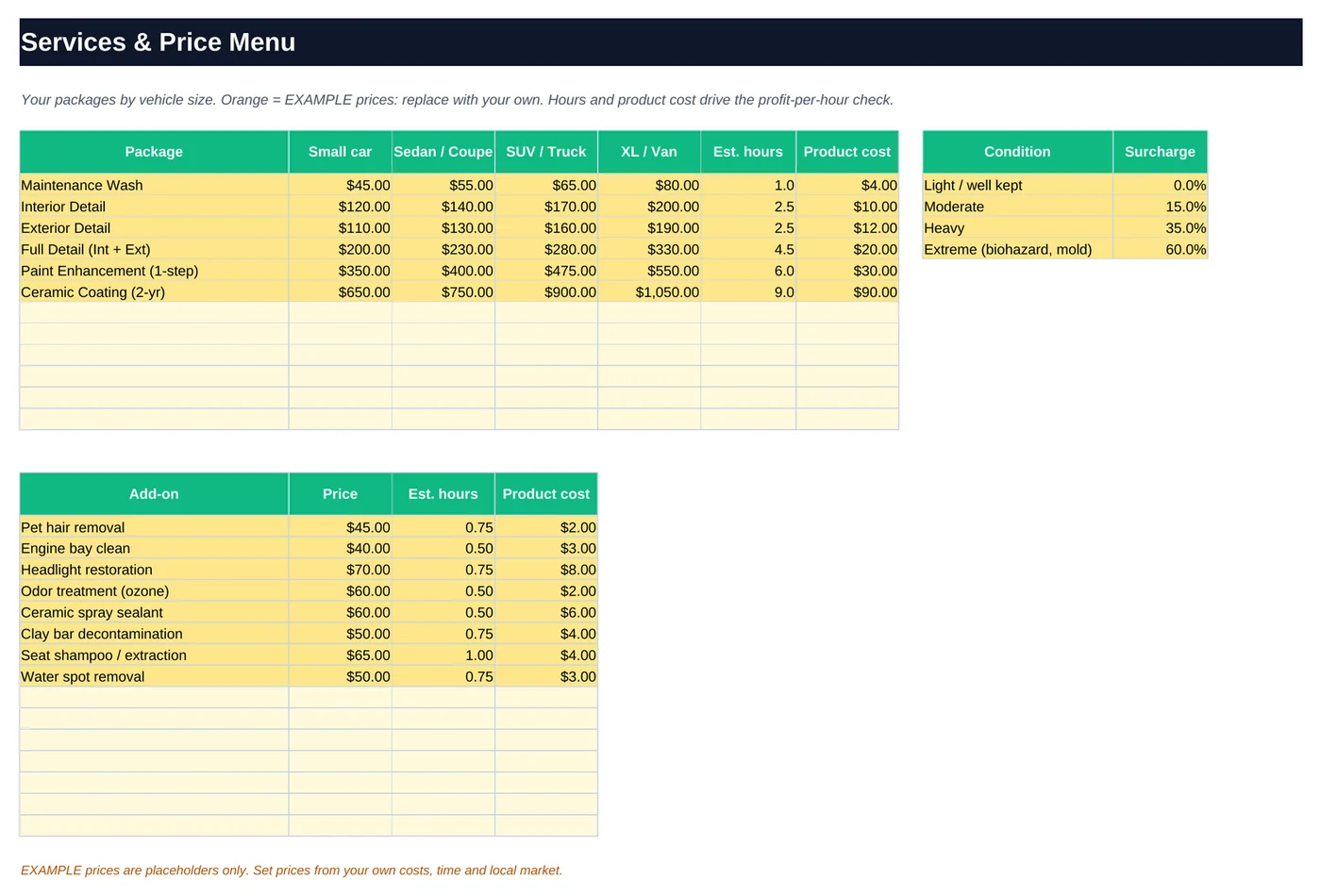
4 vehicle sizes, paint correction 1/2/3-step, ceramic 1/3/5-year with prep, condition levels and add-ons, each with time and product cost.
Quotes Log, Job Log, Expenses, Customers, Monthly Summary
See the business, not just the job
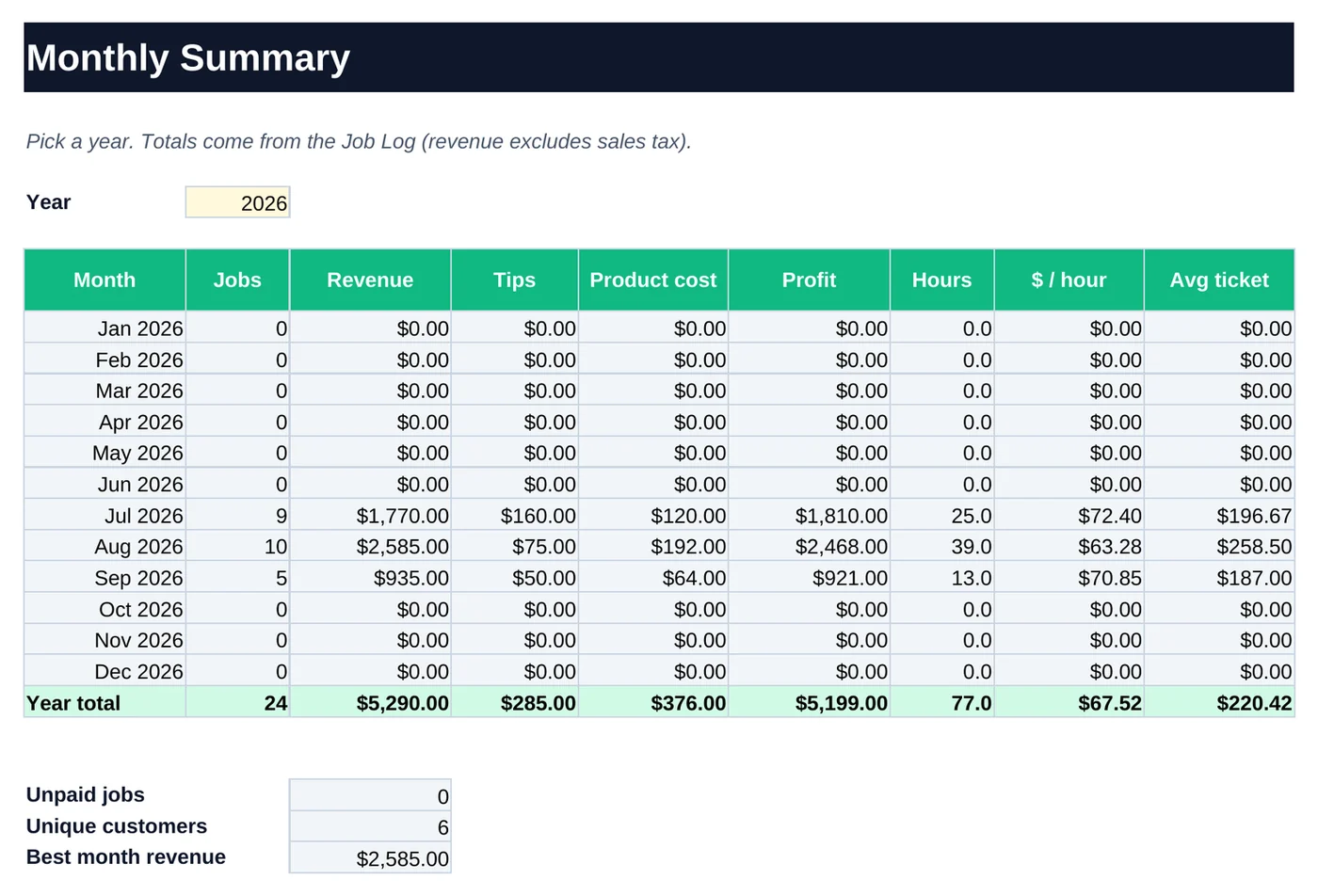
Follow up on open quotes, see your win rate, and see monthly revenue, expenses, net profit and net per hour.
For comparison, similar standalone detailing spreadsheets sell for
Plus these, at no extra cost.
All real and already in the download.
"See It Working" example business
A complete made-up detailing business with quotes, jobs and expenses filled in, so you learn by looking instead of reading a manual. Plus a blank copy for your business.
Copy-and-Send Text Templates
The quote text and the Good/Better/Best options text build themselves from your numbers. No writing needed.
Ready-to-Edit Invoice Terms
Deposit, balance-due and condition wording you can change in one place (a template, not legal advice).
15-Minute Quick-Start PDF
2 pages of setup, with Google Sheets and phone steps.
Free updates
When the kit improves, re-download the newest version from your Gumroad library at no charge.
Set it up once. Quote in seconds after that.
Set up once (about 15 minutes)
Your prices, your costs, your hourly goal.
Quote
On site with Phone Quote, or at your desk with the Quote Builder. Copy the text or send the invoice.
Log
Add jobs and expenses as they happen. The monthly numbers update themselves.
Monthly Summary
Revenue and net profit per hour, from your Job Log and Expenses
This is for you if...
- You run a mobile or small detailing business (solo or with a helper).
- Your prices change depending on your mood, the customer or the day.
- You want real numbers without paying a monthly app fee.
This is NOT for you if...
- ✕You need online booking, card payments or automated texting. A paid detailing app does that; this is a spreadsheet.
- ✕You won't spend 15 minutes entering your own prices. The examples are a starting point, not your prices.
- ✕You only use Apple Numbers (not supported).
| DetailTab | Typical detailing app | |
|---|---|---|
| Price | Monthly subscription | |
| Quotes, invoice, profit per hour | Yes | Yes |
| Online booking and card payments | No | Usually |
| Your data stays in your own file | Yes | Stored in their app |
If it stops you underpricing one job by
30-day money-back guarantee, plus our fix-it promise.
Try the kit on your next real jobs. If it doesn't help you quote faster and more consistently, email support@detailtab.com within 30 days of purchase and we'll refund you in full. No questions, no hoops.
And if a formula, dropdown or tab doesn't work as described, we'll fix it and send you the corrected file.
Questions, answered.
Can't I just make my own spreadsheet?
You can. This one already has the formulas, dropdowns, profit math, invoice and logs built and tested, so you start quoting today instead of after a weekend of building.
I'm not good with spreadsheets.
You only type in the yellow cells. Formulas are locked in Excel so you can't break them, and the example file shows every tab filled in.
Does it work on my phone?
Yes, in the free Google Sheets app. The Phone Quote tab is built for it. Do the 15-minute setup on a laptop.
Are the example prices what I should charge?
No. They're 2026 US mid-range starting points. Enter your own, and the floor price tells you your minimum.
Excel or Google Sheets?
Both: Excel 2016 or newer, Microsoft 365, Google Sheets (File > Import) and LibreOffice. No macros.
How do I get the files?
Right after payment Gumroad shows your download and emails you a receipt with the link. The files also stay in your Gumroad library. Lost it? Email support@detailtab.com.
What if something doesn't work?
Email support@detailtab.com and we'll fix it.
The DetailTab Pricing & Quote Kit
one time
- 7 working tools: Phone Quote, Quote Builder, True Profit Check, Good/Better/Best, Invoice, Price Menu, logs + Monthly Summary
- Example + blank workbooks (.xlsx) and a 2-page quick-start PDF
- Excel 2016+, Microsoft 365, Google Sheets, LibreOffice
- 30-day money-back guarantee + fix-it promise
- No subscription, no account, no macros
Secure checkout by Gumroad · instant download · 30-day money-back guarantee
Version 1.1 (Oct 2026). Example data is made up. Not tax or legal advice.